
I brought the Emporia Pro into my garage for one specific reason: I wanted to see if its bundled Vue 3 monitor could actually eliminate the need for a costly electrical panel upgrade while charging at a full 48 amps. Most smart chargers promise energy awareness, but very few ship with actual hardware clamps for your breaker box.
Bundled with the Vue 3 monitor, the Emporia Pro delivers peerless dynamic load balancing and 1-second telemetry, provided you accept its cloud leash.
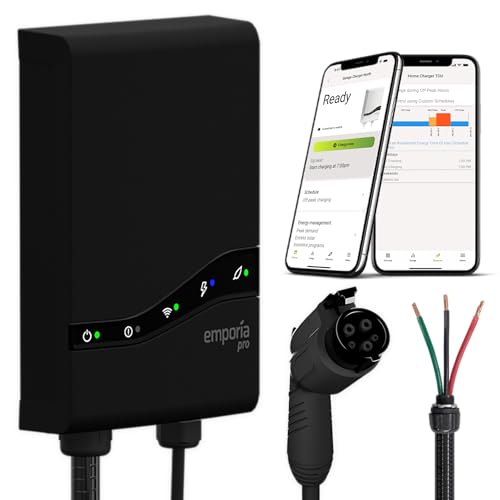
Key Specifications & Highlights
- Max Output: 48A / 11.5 kW (Hardwire) or 40A / 9.6 kW (Plug-in)
- Cable Length: 25 Feet
- Enclosure Rating: NEMA 4
- Energy Monitor: Emporia Vue 3 (Included)
- Load Management: Dynamic PowerSmart Panel Balancing
- Solar Capability: Excess Solar Only Charging
Why I wanted to test this one
Most EV chargers treat home electrical panels like an afterthought. They plug in, demand maximum current, and leave the risk of tripping a 100-amp or 200-amp service entirely on your shoulders. The Emporia Pro w/ PowerSmart caught my eye because it addresses that headache head-on by bundling the Vue 3 energy monitor right in the box.
I wanted to find out whether that monitor truly transformed daily charging into something intelligent, or if it was just another app gimmick. If dynamic load balancing works as advertised, it lets homeowners avoid a multi-thousand-dollar service upgrade just to charge at 48 amps. That proposition alone earned it a spot on my garage wall.
Getting it installed and on Wi-Fi
I opted for the 48-amp hardwired configuration to test its maximum 11.5 kW output, though Emporia also offers a 40-amp NEMA 14-50 plug-in variant. The physical hardware is solid enough with its NEMA 4 enclosure, UL listing, Energy Star badge, and a 25-foot cable that easily reaches across the bay. But the real labor isn't mounting the charger. It is inside the breaker box.
Installing the included Vue 3 requires fitting current transformer clamps directly onto your main service lines. If you hate working inside an open breaker panel, hire an electrician for this part. Getting the charger paired to Wi-Fi and connected to Emporia's cloud through the app took just a few minutes, but the CT clamps must be oriented correctly or your baseline numbers will read completely backwards.
Breaker Panel Required
Setting up PowerSmart load management requires placing CT clamps inside your main electrical panel. If you aren't comfortable around live service lugs, budget for an electrician.
Seeing live household power update every single second makes every other charging graph feel frozen in time.
Living with the app
Opening the Emporia app is like walking into an air traffic control room. You get real-time whole-home wattage and dedicated EV telemetry refreshing down to 1-second intervals. Watching the live line jitter as the heat pump kicked on or the dryer started was utterly addictive. Most rival apps feel like sluggish web wrappers updating once a minute; this is live, streaming data.
And yet, the interface is dense. It throws bar charts, historical tabs, and power dials at you all at once. I appreciate data transparency, but the visual clutter can feel overwhelming when you just want to check a charge state. For guest access, you get an app lock toggle and the Invite2Charge portal, but do not expect physical RFID cards or custom PIN pads on the hardware.
Exporting data is painless. With a single tap, the app compiles an on-demand CSV file and sends it straight to your email. I used that log to verify monthly kilowatt-hour figures, and it makes personal expense tracking or tax reporting dead simple.
Scheduling and what it actually saves
The Smart Saver feature handles off-peak scheduling, and it worked without a hiccup during my time with it. Instead of guessing electric rates, Emporia includes a custom tariff engine where you plug in your utility's time-of-use schedule. The app computes estimated dollar totals for every charging session right down to the cent.
What I genuinely love is the single-amp throttling. Most wall units restrict you to preset jumps like 16A, 24A, 32A, or 40A. Emporia gives you an analog-style slider that steps down to 6 amps and runs all the way up to 48 amps in individual 1-amp increments. That granular control gives you absolute precision over how much power you pull.
Solar and energy management
This is where the Pro justifies every single dollar. Because the bundled Vue 3 measures net energy at your service entrance, the charger executes true PowerSmart dynamic load balancing. If household demand spikes while the car is drawing 48 amps, the system throttles the EV back automatically so the main breaker never approaches its limit. That protection is gold for older 100-amp panels.
The solar surplus mode is just as sharp. You can set the Pro to pull strictly excess solar production, meaning the vehicle only drinks power that would have otherwise been pushed back to the grid for pennies. It adjusts current dynamically as cloud cover shifts. Watching the charger mirror solar curves in real time makes typical dumb chargers look prehistoric.
The Panel Upgrade Alternative
PowerSmart load management dynamically throttles EV charging current between 6A and 48A based on live household draw, protecting your main panel without an expensive service upgrade.
What happens when the internet drops
Here is my biggest gripe with the system: it lives and dies by the cloud. Emporia runs everything through an AWS-backed account. When your Wi-Fi is active and the internet is happy, the coordination between the Vue 3 and the charger is snappy. But sever that internet connection, and the brains vanish.
Offline, the unit drops back to basic, unmanaged charging. Your scheduled off-peak windows will not trigger locally, and dynamic load balancing cannot coordinate across the cloud without an internet connection. I dislike that a hardwired device in my garage cannot process local logic across my home network when the broadband goes dark.
Home Assistant and local control
If you want local smart home control, do not look for an open local REST API or direct MQTT broadcasting on the stock firmware. You will not find one. To pull the Pro into Home Assistant, I had to rely on the community HACS integration, ha-emporia-vue.
The integration works reliably and exposes an enormous array of sensor entities, from live amperage to individual phase readings. But because it scrapes the Emporia cloud API rather than speaking directly to the hardware over your local subnet, it inherits the same external cloud dependency. Security-wise, Emporia at least supports two-factor authentication on your account, which softens the privacy risk.
Who I'd tell to buy it
If you have a 100-amp electrical panel and an electrician just quoted you thousands for a service upgrade, buy this charger today. The Vue 3 bundle solves panel capacity problems through code-compliant dynamic load balancing, and it captures the best second-by-second home energy data on the market. It is also an absolute no-brainer for solar owners looking to soak up excess generation without manual babysitting.
Skip it if you demand absolute local control or want an offline-first setup that ignores the cloud entirely. But for anyone wanting maximum power, granular amp throttling, and true whole-home electrical intelligence, the Emporia Pro stands in a class of its own.
Pros
- Included Vue 3 monitor enables true dynamic panel load balancing without electrical service upgrades
- Granular 1-amp current throttling from 6A to 48A
- Telemetry refreshes at 1-second intervals with whole-home and EV monitoring
- True excess solar charging automatically tracks generation swings
- On-demand CSV export sent straight to email for clean record keeping
Cons
- Relies on cloud servers for dynamic load management, scheduling, and smart automation
- No native local API or offline Home Assistant integration without cloud polling
- App interface is visually crowded with high-density technical data
- Physical access control is limited to an in-app toggle with no hardware RFID or PIN entry
See how the Emporia Pro Smart EV Charger w/ PowerSmart compares against other models on our Full Comparison Scorecard (14 criteria tested · rated Grade A with 87.8/100 points).
The Electric Duo's Take
Verdict: The Emporia Pro pairs serious 48-amp charging capability with the best real-time energy monitoring hardware on the market. Its ability to monitor household load and prioritize solar surplus saves thousands over an electric panel upgrade. You just have to accept its reliance on Emporia's cloud servers for anything beyond basic dumb charging.
Who It's For: Homeowners with 100A or 200A panels who want 48-amp charging without an expensive electrical service upgrade, as well as solar owners wanting automated excess-generation charging.
We may earn an affiliate commission when you purchase through links on this site. This never affects our ratings or editorial independence.


